
Acuity-Based Staffing Model: FROM: Sean Reinhart, MS
I want to share some information about changes to our staffing model this year. This information was shared with building leaders in August, and we believe it important that you all understand the changes to our staffing formula so that you make needed adjustments.
The SPED department can report that overall staffing levels have remained stable from last year to this year. That said, over the past four years, the district has experienced a considerable increase in the number of students receiving special education services — an increase of 269 students. Concurrently, we have observed a notable rise in the number of students presenting with complex behavioral and emotional support needs. Although we have seen increasing demands, special education staffing levels have remained flat, prompting the need for an update to our special education staffing formula, particularly about the assignment of Inclusion Educational Assistants (EAs) at school sites.
To adjust staffing levels, we have discontinued the “all IEP weight” staffing factor that was used to help place Inclusion EAs. The “all IEP weight” factor provided some Inclusion EA staffing based on the school’s total number of students with an IEP, regardless of needs. Within this acuity-based staffing model, Inclusion EA allocations have been determined by individual student need and level of support required. Under this model, students are identified through a collaborative process involving school-based teams, case managers, and Student Services administrators, and coaches. This process includes a review of the staffing needs assessments completed by case managers, direct observation of students by learning specialists, coaches and admin, consultation with school staff, and IEP review.
Why does this matter?
Now, Inclusion EA staffing is designated exclusively to support students with the highest acuity needs. Students with mild disabilities are not factored into the EA staffing formula. It is important for you to recognize this and make any adjustments to staffing schedules. We understand that this represents a shift, and we are committed to maintaining transparency and open communication throughout the implementation process. The Student Services administrative and coaching teams are available to partner with building administrators and teams to review and discuss staffing allocations, support the development of schedules, consult on service delivery models for specially designed instruction, and strategize student grouping to maximize support and efficiency.
Thank you all for you dedication to your students and ensuring that they have access to a great education.
Manage Student Teams-from Shannon Watters
We’re currently experiencing an issue with the Manage Student Teams feature. Right now, the ability to mass add a person to a student’s team is unavailable. We know this is inconvenient and appreciate your patience.
Here’s what’s happening:
- Edupoint recently released a new feature designed to let us mass add an entire team to all students at one school.
- Unfortunately, the feature is not working as intended and, in some cases, is adding the team to every student in the district.
- This update has also affected the traditional Manage Student Teams tool—checkboxes are not appearing correctly, and the Select All/Deselect All option may not function as expected.
We have submitted a ticket with Edupoint, and their team is actively working on a fix. We’ll keep you updated as soon as we have more information or a resolution.
Thank you for your patience and understanding as we work through this issue.
Please reach out if you have questions!
10-Day Inactivation Process to Attendance Staff: From Eric Powell
On August 27, your secretarial staff who input/track daily attendance received the following information regarding changes to our 10-Day Inactivation process.
Here is a link to that information: 10-Day Inactivations
The key highlights for you to know about are:
*Synergy will auto-send attendance letters to families after a student has missed 6 consecutive school days (Unexcused or Unverified ONLY)
*Synergy will auto-send attendance letters to families after a student has been 10-day Inactivated
*Both of these letters request families to connect with the school to schedule a meeting focused on supporting the student return to school
*At days 3, 6, and 9, school teams are asked to designate a staff member to reach out to the family to check on the student
*If a student is 10-day inactivated, your school team can fill out a Request for Assistance to ask the District’s Tier 3 Attendance team for support with a Home Visit or family outreach
DONATIONS NEEDED

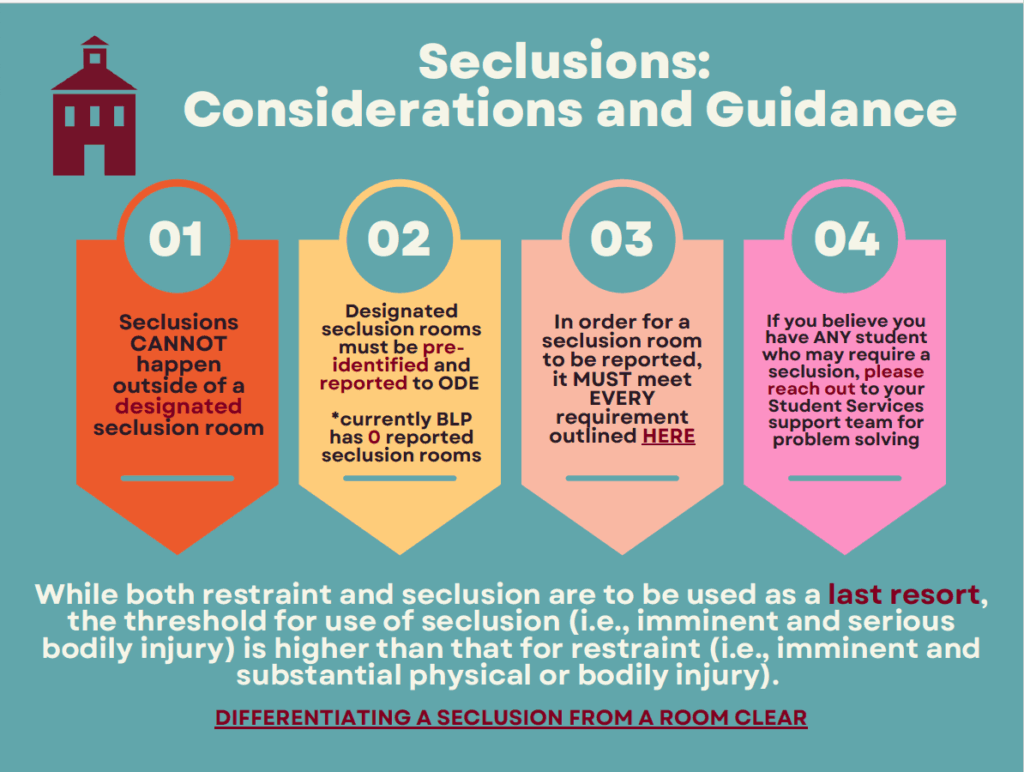
SECLUSIONS: CONSIDERATIONS AND GUIDANCE: from Sara Young
Pingback: September 18, 2025 – Thriving Together
Pingback: September 24, 2025 – Thriving Together
Pingback: October 2, 2025 – Thriving Together
Pingback: October 9, 2025 – Thriving Together
Pingback: October 16, 2025 – Thriving Together
Pingback: October 23, 2025 – Thriving Together
Pingback: October 30, 2025 – Thriving Together
Pingback: November 6, 2025 – Thriving Together