
FROM THE DESK OF SEAN REINHART
Credit Recovery Options
Below is a link for all the options in BLP for credit recovery. Please know that the options listed in the link are the ONLY options available at this time. The “work packets” that had been utilized in the past are not an option and have been discontinued. To see all available credit recovery options, click on the link below:
25-26 BLS Credit Recovery Options
Modified Diploma Initial Consent
There are two different forms by which parents can provide initial consent to place a student on a modified diploma:
- If a student has a 504 or and IEP, the modified diploma parent signature form lives in Synergy SE as an adhoc document.
- If a student does not have a 504 or an IEP, then school counselors have access to this Initial Consent for Modified Diploma form, which a team will complete, and parents will sign. This form has been updated and can be found in the school counseling manual.
Notice of Modified Courses
When a student with an IEP has modified coursework, the case manager needs to communicate the changes to the counseling secretary and affect teachers. Each semester/trimester, case managers will need to complete the Notice of Modified Coursework form. This form has recently been updated and can be found on the Student Service website. For 504 or Non-IEP students with modified coursework, this will be completed by the school counselor.
FROM THE DESK OF SHANNON WATTERS
Adding a Team Member to a Student’s Team
You can add a Team Member from either the Student view – Team tab or by using the Team button in the Snapshot view.
- Open the Team Tab
- Hover over the student’s name in Portfolio to open the Snapshot view.
- Click the Student Team button to go to the Team tab.
- Search for StaffNote:
- In the Team Members grid, click the Chooser button.
- Enter search criteria (Last Name, First Name, School, or Role ID) and click Find.
- Tip: Keep searches simple—for example, last name plus first initial.
- Select the correct staff from the Find Results by clicking on the row. You may add multiple staff before clicking Select.
- If your focus is set to an individual school, only staff at that site will appear. To add staff from another site or High Desert ESD, change your focus to Bend-La Pine Schools.
- Finalize Selection
- Click Select to update the student’s Team list.
- The student will now appear on the staff member’s Portfolio.
- Adjust the staff member’s Role as needed.
Important Reminders:
- If you remove yourself from the Team list, the student will no longer appear on your Portfolio.
- Listing yourself in multiple roles will cause the student to appear multiple times.
- Every student must have a Case Manager. If changing Case Managers, add the new one first before deleting the old one.
SECLUSIONS: CONSIDERATIONS AND GUIDANCE: from Sara Young
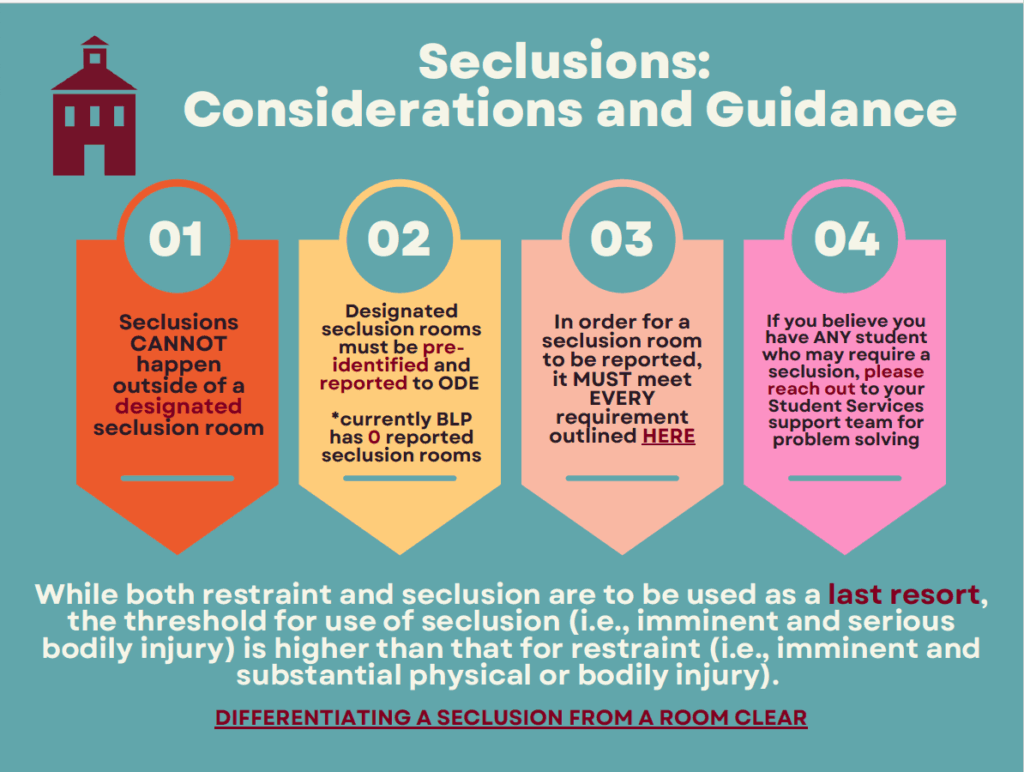
HERE IS THE PDF VERSION OF THE GRAPHICS
EDUCATOR SPOT LIGHT
Christina Holler is a learning specialist at Pacific Crest and I think she does an amazing job. In this email she’s celebrating and sharing some of the tools the Gen Ed teachers are doing to support our students with IEPs at PCM. ~OLIVER TATOM, RN
Hi Everyone,
I wanted to send out some awesome supports I have seen as I am pushing into classrooms. These came from 6th grade Language Arts & Science as well as 7th grade Math. These are awesome examples of fillable notes and graphic organizers to help with student workflow.
- I loved how Language Arts made the checklist boardgame style. I think this really helped students visualize what they needed to do, start to finish, in a really fun way.
- These Math notes were awesome! Not only were students keeping pace with their peers, but while I was supporting their notetaking, I was also able to create my own notes to easily reproduce for students who missed the review day (or students who lost theirs by test day)
- Science has made smaller copies of fillable notes for students to tape into their class provided notebooks. I love that this creates a singular place for them to reach notes when needed. This limits clutter and the worry that notes will be lost (assuming they don’t lose their entire notebook 😬)
I also wanted to share an example of some sentence starters I made by partnering with an 8th grade Language Arts class I am not currently in. It was shared with me that some students were having difficulty getting started on this activity. I went to ChatGPT, entered in some pertinent information to the assignment, and asked for an example outline and sentence starters. It took about one minute of prompting and editing to get some chunking/organizational tools for students. Feel free to make a copy and adjust as needed if you have assignments that could be supported by this. Also, if you find yourself in situations like this, or what some support as to how to use AI to make supports, please reach out and I will do my best to create some options to help support students.
I don’t push into everyone’s classes which means I am not seeing all the amazing work being done across the school, but I wanted to celebrate some of the awesome strategies I am seeing! Thank you all for your hard work in supporting PCMS students!
Thanks,
Christina Holler, M.Ed.
SHOUT OUT EDUCATOR SPOTLIGHT

Pingback: Secondary Blog October 3, 2025 | The Secondary Blog
Pingback: October 2, 2025 – Thriving Together
Pingback: October 9, 2025 – Thriving Together
Pingback: October 16, 2025 – Thriving Together
Pingback: October 23, 2025 – Thriving Together
Pingback: October 30, 2025 – Thriving Together
Pingback: November 6, 2025 – Thriving Together