Films can spark discussion, deepen understanding, and bring curriculum topics to life. With Swank K-12 Streaming, teachers and administrators now have a simple, legal way to use films that support learning across content areas and school community events.
Swank FAQ
What is Swank?
Swank is our district’s new streaming service for feature films, offering a library of 215 titles, with the option to request additional films when needed. It also replaces the use of personal streaming services and hardwiring devices.
Who can use Swank?
Swank is available to certified teachers, administrators, media managers, and office managers for instructional and school community use, like showing film in class, movies during lunch on Fridays, or family movie nights.
How do I access Swank?
Use this link to access Swank for Bend-La Pine Schools: https://bls.fyi/swank. Check out the Swank User Guide for quick tips.
Do I still need permission slips?
Yes. Please follow the district’s feature film guidelines before showing a movie.
What about films in other languages?
Each film comes with its own language options, which vary based on the age of the film and what the motion picture industry provides. Many films include multiple audio and subtitle languages, but if a specific language isn’t offered, it unfortunately isn’t available through Swank.
What if the film I want isn’t coming up in the search?
Swank holds licensing agreements with a wide range of film studios, and any movie that appears in the Swank catalog or in search results is already licensed and available for district use; however, there are some exceptions to be aware of:
- If a title appears with a “Request” option, please complete and submit the request form; if approved by the EdTech department, the film will be added to the district-wide catalog.
- If a title does not appear in search results at all, Swank does not hold the rights to distribute it and cannot provide access. In this case, Swank cannot be used to access the film.
- If a title appears with the note “Additional time (4–6 weeks) & fees apply to process request,” Swank does not currently hold the license, and Bend-La Pine Schools would be responsible for the cost of obtaining it. In this case, Swank cannot be used to access the film.
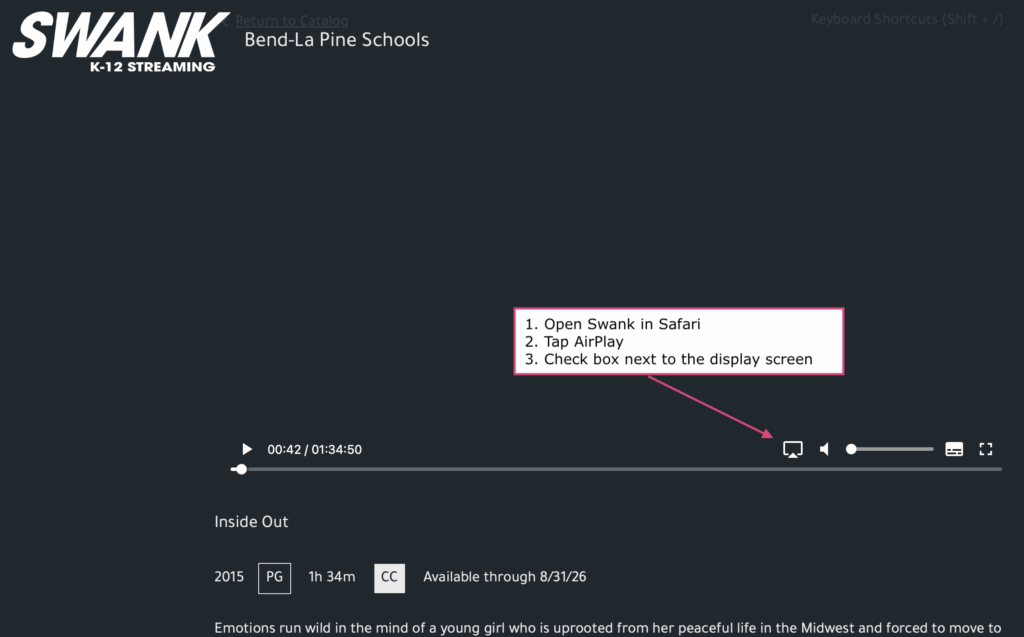
How do I show a film on my classroom screen?
Open Swank in Safari and use AirPlay to project to your Apple TV. AirPlay streaming not available in Chrome or Firefox
Can students watch films on their iPads?
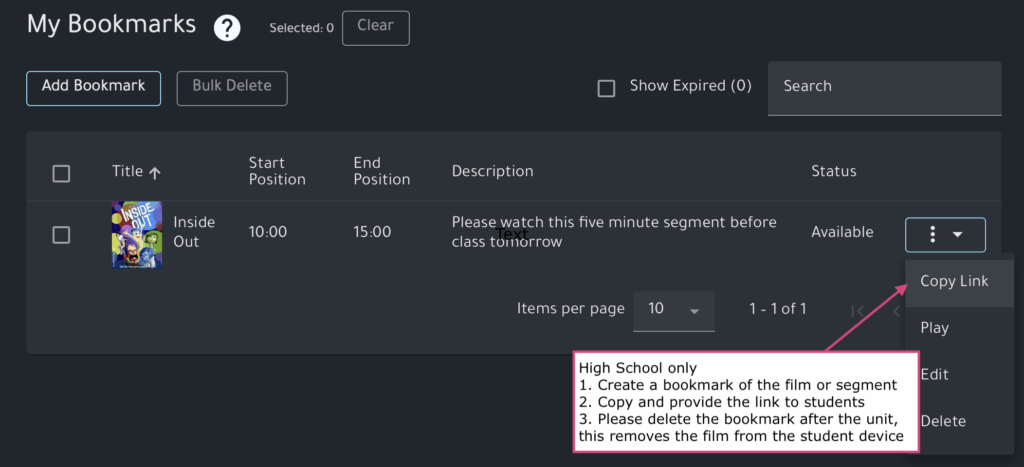
Yes, in high school only. Teachers can make films available using the bookmark feature. Please remember to delete the bookmark when students no longer need access, this is the only way to remove the film from the student device.
Can substitute teachers access Swank?
Yes, but with some help from the office or library staff. Using a loaner BLS device, subs will navigate to Safari, and then https://bls.fyi/swank and login using the gueststaff login credentials. These are found in Admin Tools, change daily, and are provided by the media manager or office staff. The email address will always be [email protected].
Looking for a helpful hand? Contact Educational Technology: [email protected]
