YouTube can be an incredibly valuable instructional resource, but it can also introduce distractions that make it harder for students to stay focused on learning. As part of our district’s ongoing effort to keep student technology centered on educational purposes, student access to YouTube is restricted.
Staff continue to have full access within our districtwide filtering. Teachers can still show YouTube videos to an entire class using classroom projectors and TVs. However, there are also times when students need to access specific videos individually on their own iPads. That’s where YouTube Buddy comes in.
What is YouTube Buddy?
YouTube Buddy is a district-created tool that allows teachers to make specific YouTube videos available to students while maintaining the benefits of restricted general YouTube access. Teachers can submit a YouTube video to YouTube Buddy, which adds the video to the student allow list and creates a special link that can be embedded in Canvas or shared with students in other ways.
When a student opens that link, they see only the selected video. There are no ads, no suggested videos, and no autoplay pulling students into unrelated content. It is simply the instructional video the teacher intended for them to view.
Videos added through YouTube Buddy are not district-vetted. The decision to use a video remains with the teacher, based on their professional judgment and the instructional needs of their students.
New This Year
YouTube Buddy received several upgrades this year that make the process faster and easier for teachers. Teachers can now:
- Add videos themselves using the new YouTube Buddy interface.
- Search videos already added by other teachers across the district.
- See useful information about each video.
- Make videos available to students with an almost immediate turnaround time.
You can access YouTube Buddy at bls.fyi/youtubebuddy.
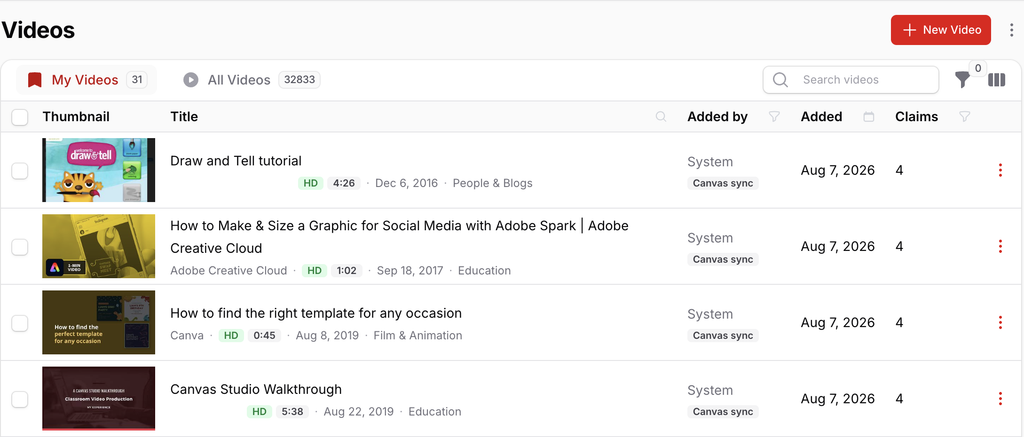
YouTube Buddy Now Scans Canvas
YouTube Buddy automatically scans published Canvas courses for embedded YouTube videos and adds those videos to the student allow list. There are a couple of important exceptions:
- YouTube links contained inside attachments, such as Google Slides, are not detected. Those videos need to be added manually through YouTube Buddy.
- YouTube videos in unpublished Canvas courses will not be added until the course is published.
- Videos stored in Canvas Studio but not included in a published course are not automatically added.
A Note to Jamf Teacher Users
If you’re using Jamf Teacher for iPad management, you will need to add three URLs to the Allowed Websites list in order for students to view YouTube links. You do not need to add the URL to the exact video. Please see Jamf Teacher User Guide for those URLs and other information.
Keeping Student Technology Focused on Learning
By giving students access to the specific videos they need without ads, autoplay, suggested content, or unrestricted browsing, we can preserve the educational benefits of YouTube while reducing opportunities for distraction. YouTube Buddy gives teachers more flexibility, gives students access to the instructional content they need, and helps us continue working toward a shared goal: keeping student technology focused on learning.
