Maybe it’s been awhile since you took a look at the Email Communication functions available in Synergy.
If you, like most of us, just switched over to Outlook, you might take a minute to weigh the pros and cons of using Synergy for Parent/Student communications instead of recreating your parent email lists in Outlook. Synergy’s email system was pretty clunky when we first trained on it, but there have been a lot of changes and I bet you’ll like it now. Here’s why:
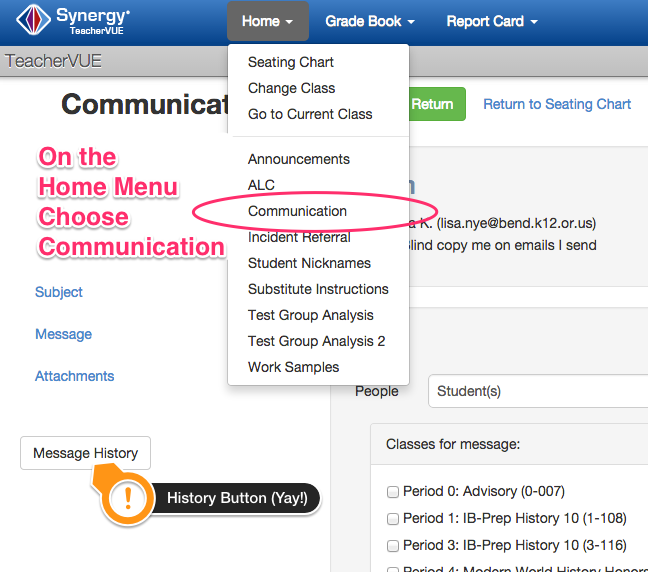
1. Emailing History: There is now a History screen (yay!) where you can go back and see what you’ve sent. This didn’t used to be there and was the main reason most people didn’t use Synergy to email parents from the start. You used to have to cc: yourself which would then proceed to send you a copy for every.single.student.parent…what!??. It was crazy. The cc: will still do that, but you don’t have to use it anymore, because the history screen shows you what you’ve written in the past. So that’s awesome. And necessary.
2. Correct Email Addresses: The email addresses stored in Synergy are the most current ones AND you are not responsible for making sure they stay current —the parents are. They can get on to ParentVue and change their personal info anytime they need to, so that takes you completely out of the loop.
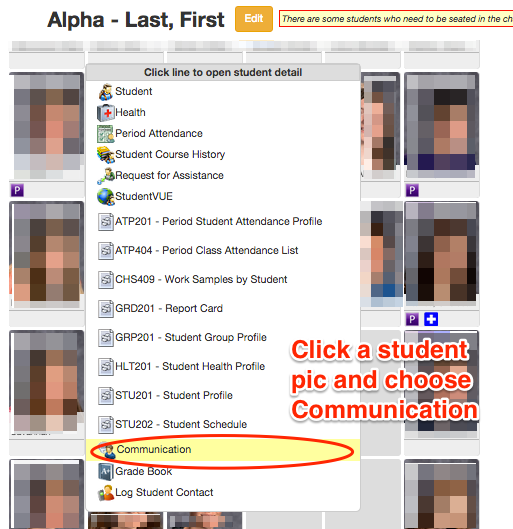
3. Full Class Lists Already Created: You can email a single student/parent right from their cute little picture in teacher view or you can email entire classes (or ALL your classes at once if you’re secondary).
…Attachments are allowed. Replies come straight back to you in your regular email inbox.
There’s hardly a reason not to use the feature.
Do you want a refresher on where the buttons are?
Here you go:
For Communicating to the whole class–
For Communicating with just one Student/Parent