Dear Parents and Guradians,
We are now entering our 6th week of school (if you don’t count the 1st short week – Confluence) and we want to make sure you are building a good understanding of:
- How you student is doing so far in their academic journey this year
- How to navigate and understand ParentVue and Standards Based Grading at RMS
Teachers at RMS have and/or will push out Midterm Progress Reports by email. You should receive these Midterm Progress Reports for the following classes:
- Math
- Humanities
- Science
- Art
- Mind & Body
- You will NOT receive a midterm progress report for Crew, Workshop or Electives.
These Midterm Progress Reports are simply a snapshot of the information is ALWAYS AVAILABLE TO YOU in ParentVue!! You need not wait for a progress report from the teacher to stay caught up with your student’s progress. Check ParentVue ANYTIME – the midterm progress report information is straight out of ParentVue!
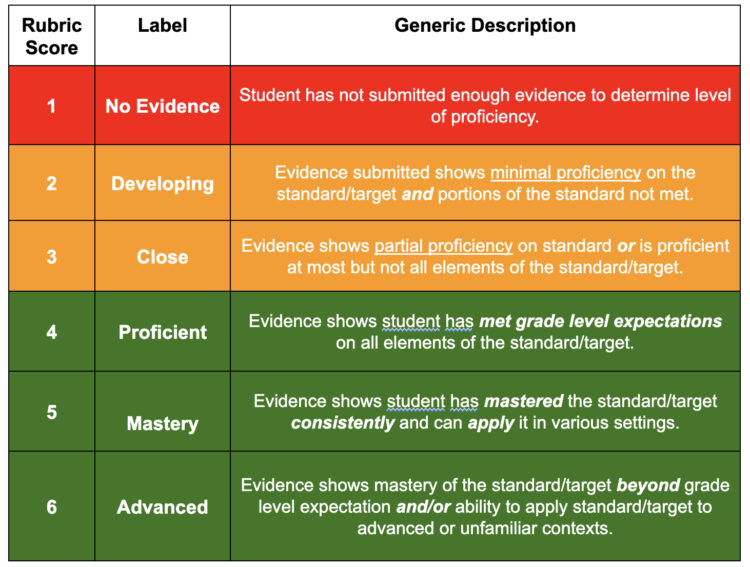
How do I determine my student’s proficiency level? At RMS, we do NOT report overall letter grades… so to know how your student is doing, you must look at the “standard scores”!
- There are two views for parents in ParentVue – the Standards View and the Assignment View… BOTH are useful!
- To determine proficiency, you should look at the score on each of the Standards View in the class. At RMS, we have a “proficiency scale” that goes from 1-6. A score of 4 indicates the student is “at grade level” on the particular skill or content standard! Any standard with a score below a 4 is an area for growth. See image below.
How do I determine if my student is “caught up” or staying on track? In ParentVue, use the “Assignment View” to see if any assignments are missing! Missing assignments should be completed as homework!
- Important tasks or assessments that are missing will be marked with a red “Missing” comment
- If your student does not know how to complete the missing work, they should work with their teacher and as a parent/guardian, you are welcome to contact the teacher as well!
What do I do if my student’s scores are concerning? What if they have Missing Assignments?
- First, remember that there is STILL lots of time to improve grades! We are barely half of the way through the trimester and students are still just digging into some of these standards. They will have MORE TIME to build skills and demonstrate proficiency!
- Missing assignments are in many ways a BIGGER CONCERN right now than low standard scores! Missing assignments typically mean the student is not finishing their work in class and likely needs to complete it for homework!
- Teachers DO (almost always) allow students to submit late work and/or to re-take or re-do assessments/assignments to demonstrate increased levels of proficiency. Students are encouraged to talk (or email) their teachers!
Feel free to reach out by email or phone to your student’s teachers at any time!
Accessing and Navigating ParentVue!
Parents can check their student’s grades at ANY TIME using ParentVue.
At RMS, ParentVue is the GO TO place for students and their parents/guardians to see academic grading information. Canvas is the workflow tool for students but NOT the gradebook. This is different than other schools in our District who are using Canvas as the default gradebook!
For all middle school students, we strongly encourage students to visit ParentVue every week or two for a quick check! The transition to high school isn’t always easy, and it takes ALL OF US to stay on top of any “slips” as early as possible!
If you need help accessing your ParentVue account, start here on this help page. If that does not provide the information you need, please call our office and we will help you get logged in. Email [email protected] for middle school ParentVue support.