***This app is now available to all schools UPON REQUEST.
Classkick is a cross between a classroom management and collaboration tool for teachers who have 1:1 iPads in their classroom. Essentially, the teacher must create, upload a worksheet, or take a photo of the task you want your students to complete into the classkick app on your teacher iPad. The students then open classkick and enter a code to see what the teacher has uploaded. In seconds, the students begin working on the task using tools similar to the app Notability. What is unique is that the teacher sees EVERY student’s work LIVE on the teacher ipad! (thus the classroom management application) This photo shows what CLASSKICK looks like from the teacher’s point of view:
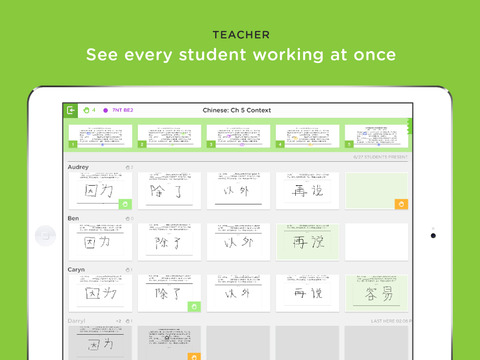
BUT WAIT THERE IS MORE…..Brian Miller, a math teacher at Pacific Crest, showed me that when a student has a question they simply touch the “raise hand” icon and their little screen turns red showing that they need help from the teacher. He can also see if a student’s solution is off course and assist the student before they repeat their mistake over and over again.
Hearing this, I bet most teachers are thinking why would I want to answer questions on tiny screens when I could walk to the student and work with them face to face? Brian pointed out that most kids are going to make similar mistakes in the lesson. When enough screens turn red…he can touch a button that assigns a student who needs help with students who understand the skill. (thus the collaboration) Even better, the students are all given random silly names in this environment so that each kid does NOT KNOW who needs the help…or who is giving the assistance. I love this feature!
Brian states that occasionally his teacher iPad will quit the application. This is most likely due to the heavy amount of connectivity required by this app. He pointed out that it is quick for him to reopen the app and that there have been very few instances where students have had connectivity issues. It is for this reason that we currently have this app available PER SCHOOL REQUEST. That means it will not be in self-service for students until a teacher from your site asks for it by using the web help ticket app request form.
Feel free to visit Classkick’s website or download their app on your teacher iPad to learn more about how you might use this unique tool.

Hi Scott,
Thanks so much for featuring Classkick in your blog! As a Classkick enthusiast, please consider becoming a Classkick Ambassador or Mentor to receive updates on the newest Classkick features and resources to share with teachers or promote on your blog. More information here: http://www.classkick.com/ambassadors-and-mentors
Thanks again!