
Curious about Pear Deck?

OUR ELEMENTARY COLLEAGUES LOVE IT FOR A REASON! IT CAN BE JUST AS GREAT FOR SECONDARY STUDENTS.

Skyline and CDL’s math teacher Gabe Schepergerdes loves it and uses it on a daily basis. At Skyline, it is used so commonly that a subscription is provided for the staff. The CDL team was converted immediately upon seeing a demonstration about how he uses it. Throughout K-12 education, the teachers that know it, love it. No matter what grade or subject you teach, if you use slideshows, PearDeck is a fabulous engagement tool that is as easy for you as for them. Are you curious?

Gabe sells it better than I can. He provides a demonstration about how he uses it on a daily basis with his class. Because his demonstration was provided for an audience, you will be able to see both the teacher view and the student view of the experience. If you are someone who struggles to keep students engaged, or if you are also looking for new engagement tools, Gabe’s video explores this fantastic option.

GABE’S TRAINING SESSION (16min): https://bls.webex.com/bls/ldr.php?RCID=5d0c5c95db134b91adf591b635a3aa68 PASSWORD: YcqQSNP2The Pros of Pear Deck:

  • The Pro’s of Pear Deck:
    • Screen-sharing take A LOT of bandwidth and students don’t always have enough as it is. Pear Deck allows students to open your slide show, thus allowing you to remain in a regular WebEx session which is much more manageable for the bandwidth capabilities of many families.
    • Pear Deck works with either of our slideshow platforms: PowerPoint or Google Slides.
    • You get a real-time typing view of student work, meaning that you don’t have to wait until they press ‘Send’ to begin to prepare your responses. This also allows you to message students directly based on the direction you are seeing them heading in, rather than having to wait until they are finished to offer guidance.
    • Students do not see each other’s responses unless you share screen so that they can. You see everybody’s, but they do not. This allows you to ask more challenging questions, or for students to complete more challenging tasks without needing to send work to you through a different platform.
    • Pear Deck is free as a Google Add-on. This means that if you click on the 3 x 3 buttons on the top right of your screen, Pear Deck will be one the of the options.
  • The Con’s of Pear Deck
    • The platform improves significantly with $150/teacher. (To see the comparison list: https://www.peardeck.com/pricing) I know we are not there yet, but hopefully, in the future, we can begin to consider site or department tech subscriptions as part of a site’s curriculum or tech budget, rather than only available if provided by the district or if a department is willing to pay the entire bill (which would take most of a department budget).
    • One of the improvements in a Pear Deck subscription is a student-paced option, which would allow you to use Pear Deck for asynchronous presentation as well. Free Pear Deck is live delivery/teacher-paced.
    • Also with a subscription comes the options for students to use a drawing feature to show their work in more ways than typing words.

On balance, Pear Deck is a superior application that dramatically enhances the engagement potential of our slideshows. Whether in a live or virtual classroom, this is an app you can use. If you agree that Spring Break is an excellent time to pick up a new tech skill, we encourage you to consider this one.


Can you Give me an Example?

FEW OF US TAKE ON A NEW TASK WITH NO IDEA WHAT IT WILL LOOK LIKE TO BE GOOD AT IT.

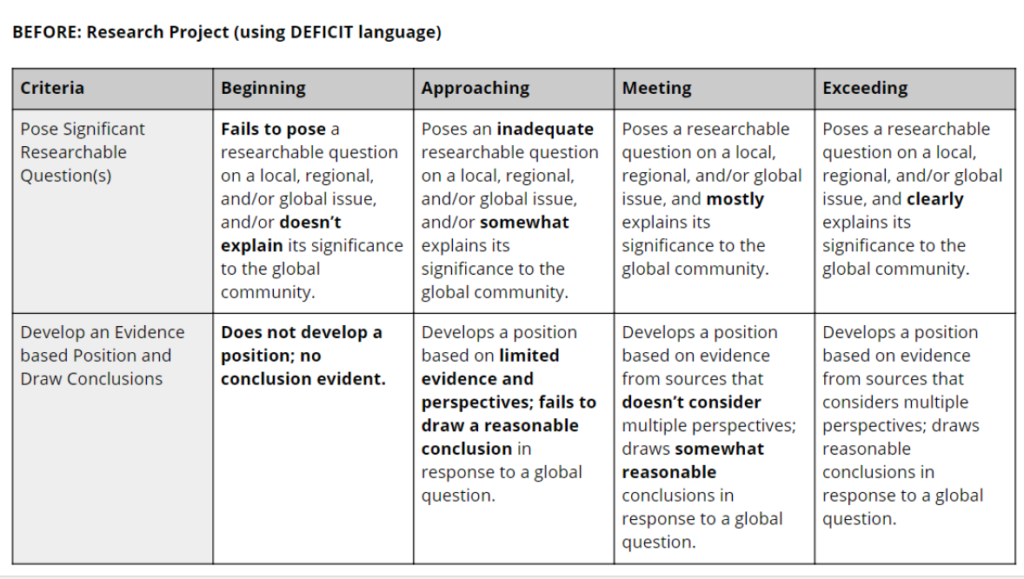
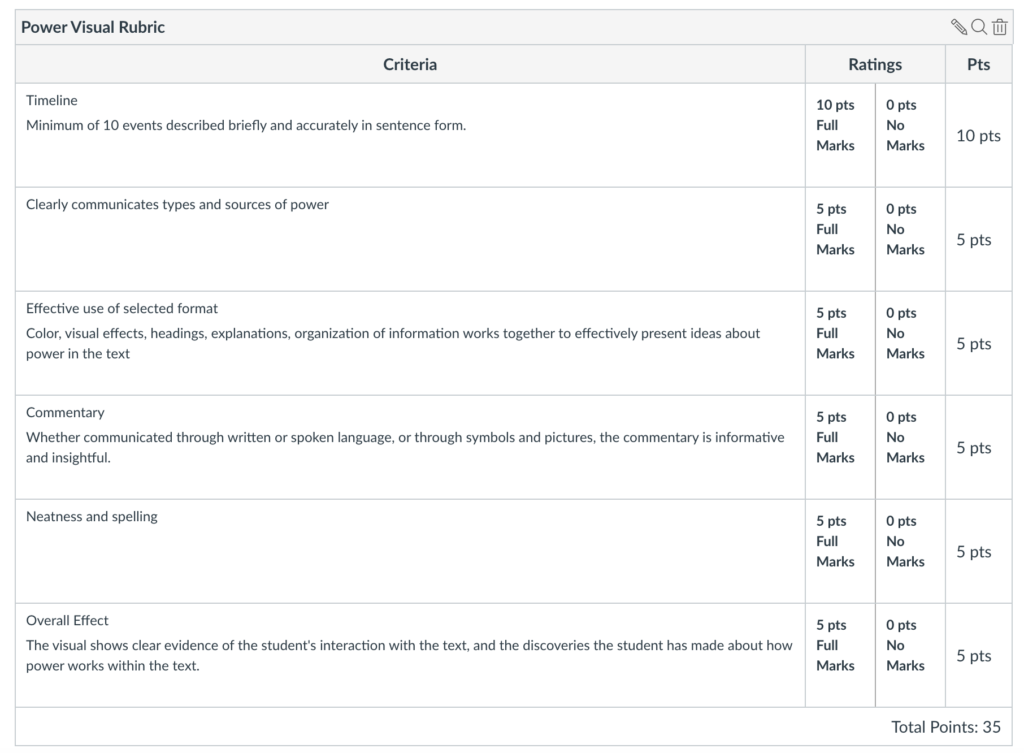
For our students, the use of exemplars (aka working examples or models), help them to know exactly what success will look like. Previous blog posts in this series have been on the importance of telling students what and why they are learning as well as providing a rubric that defines success.

This post is about showing students work that they can score against a rubric to deepen their understanding of what success looks like.

Any assignment that is given can have an exemplar. There are generally three phases to instruction with exemplars.

1.INTRODUCTION. Share with the students the exemplar. Tell the students that this example is from a previous year or period. You may or may not share the grade the exemplar received.

2. TRAINING. Have the students read or study the exemplar based on the rubric that has been provided. Point out the important aspects of the rubric or exemplar. It is very powerful for you show the students how you think as you analyze the exemplar or rubric. Using “I-statements” such as, “When I see this essay, the first thing that I notice is that there are clear subheadings that tell me how the text is organized” or “When I see this lab report, I notice that the vocabulary words from this week are included in the appropriate sections.” Through metacognition we train the students how they should be thinking when they analyze the exemplar and their own work before they turn it in.

3. APPLY LEARNING CRITERIA. Have the students engage with the exemplar by themselves or with a partner. As the students analyze the exemplar, they learn the success criteria, rubric. An especially useful extension activity can be to provide students with multiple exemplars and let them work together to determine what works and what doesn’t, which are stronger/weaker, etc.

You may provide an exemplar that is high-level or work or one that still needs work. By analyzing a less-than-perfect exemplar, they can use the rubric to see where improvements may need to be made or why.

Student after student will say, “The most helpful thing you did was show me examples when an assignment was really complicated.” Teacher after teacher might say, “That took time I didn’t have, and it didn’t teach them anything new. Was it worth it?” Yes. And yes. And yes.

Taking the time to show your students what the end product might look like is an equalizing and generous act because it understands that students want to succeed, and it recognizes their insecurity about how they might do it. Examples help them build a road from assignment to finished product.

“How do I Get There?” Students as Participants in their own Learning

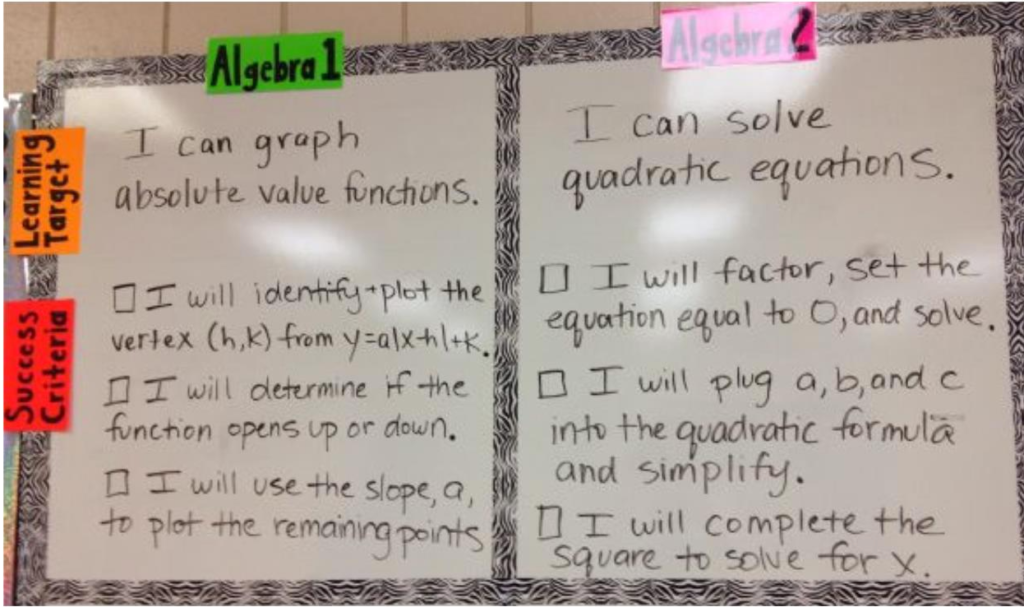
Last week’s blog focused on the importance of communicating clear learning intentions: the WHY of our lessons. This week, we focus on student success: WHAT does success look like?

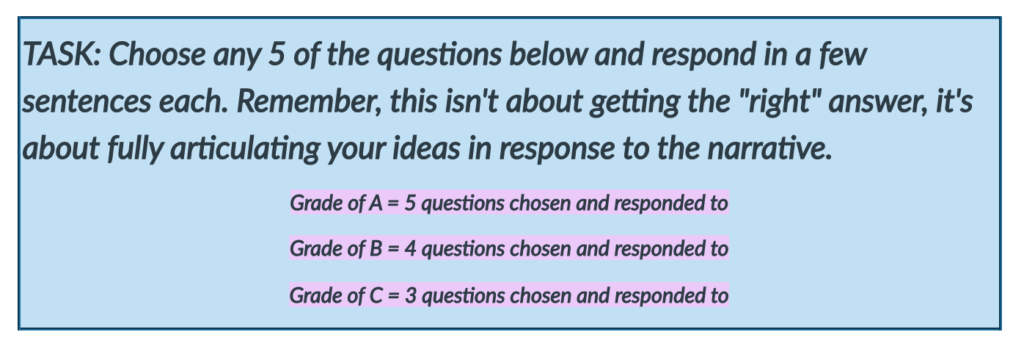
LEARNING INTENTIONS tell students where I am going; SUCCESS CRITERIA help students know how they are going to get there, and what choices they will make along the way. Students must have a clear expectations about what it looks like to be successful in the learning endeavor they are about to engage in. Success criteria provide a framework, a set of rules that students will use to understand their success in learning.

Success criteria tells students how far they will swim before they dive into their learning.

Well-written criteria give students feedback about learning. Feedback does not always have to come from the teacher. Because they know their success criteria, students can engage in more meaningful conversations with their peers about their work. Such peer assessment is they type of assessment that we get in real life. (I assure you that I shared this blog post with my peers, received feedback and made adjustments before posting it!)

Well-written criteria also enables students to engage in more effective self-assessment. Rather than asking them “How do you think you did,” we can ask them, “Where do you believe you scored and what justification do you have for your reasoning?”

Not providing success criteria is similar to coach telling their team to play a game, but not telling them how to win or, even, very many of the rules. We’ve all been there at one time or another: think of that time on the playground when nothing was clear and we had to figure out the game as we went, hoping we got it right. Sure, some of us kept playing. Many of us walked away, accepting lesser playground status, feeling like outsiders because we didn’t seem to know what the other kids understood innately.

Clear learning intentions and success criteria have been shown to increase levels of engagement and motivation because the rules of the game are clear, and students no longer feel unsure of what to do next or what they are trying to accomplish.

When kids know their success criteria, the playground works. When students know their success criteria, the classroom works.